Ok, i give up, how do i insert a picture into a post?
Duh, how do i insert a picture into a post?
under your add new post the is a little app to upload your image.
see...ok it's not working
ok, once i've browsed for the picture and click upload what next.
It's not easy being the village idiot! ;)
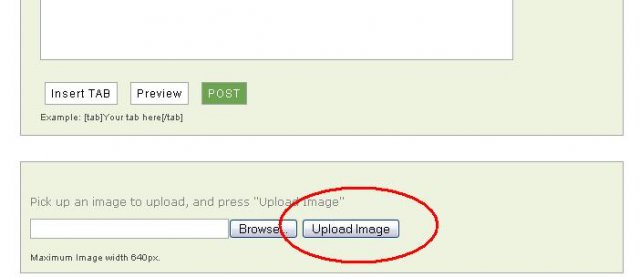
ok....how the hell did u do tht 1 tele
Thanks telecrater,
the best i could do was inset the hyperlink into my post. it still doesn't show the picture in the original post but i guess it will do.
URL GOES HERE [)/IMG]
without the ) bracket
nutter,
does the / belong in there?
I don't want to screw up again, I might start believing what everyone else is saying about me. lol
Yep its to signify the end of the url
How to insert an image into post
1) use the tool at the bottom of the "Add New Post!" tool to find the image you want. Then press the "Upload Image" button.
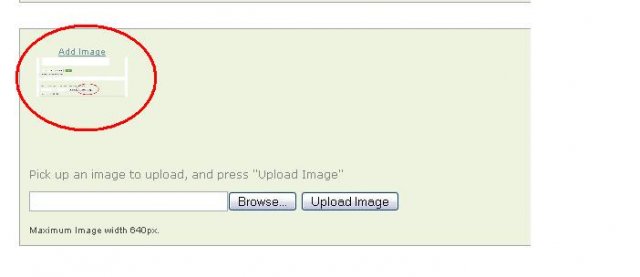
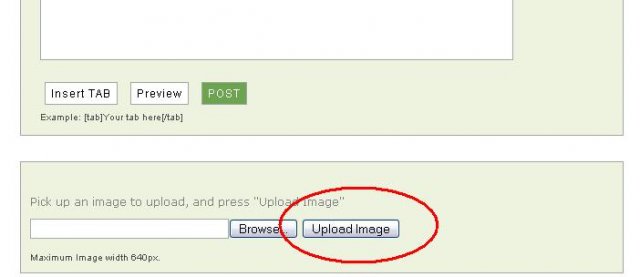 2) When the page refreshes scroll back to the bottom and there will be a little Thumbnail of the the image.
The image has been uploaded to the forum you need to click the "Add Image" link to create the link.
 3) Once your done press the "Post" Button.
2) When the page refreshes scroll back to the bottom and there will be a little Thumbnail of the the image.
The image has been uploaded to the forum you need to click the "Add Image" link to create the link.
3) Once your done press the "Post" Button.how do u make the cirle things?!?
lol, I have mastered the art of MS Paint!!
if you press Ctrl, ALt, and Print Screen buttons at the same time you can get a screen shot of the program. open up paint to resize. Paint has a feature to make circles. I then saved as a .jpg and uploaded.
Maybe we should have a help tech section?
lol thnx.